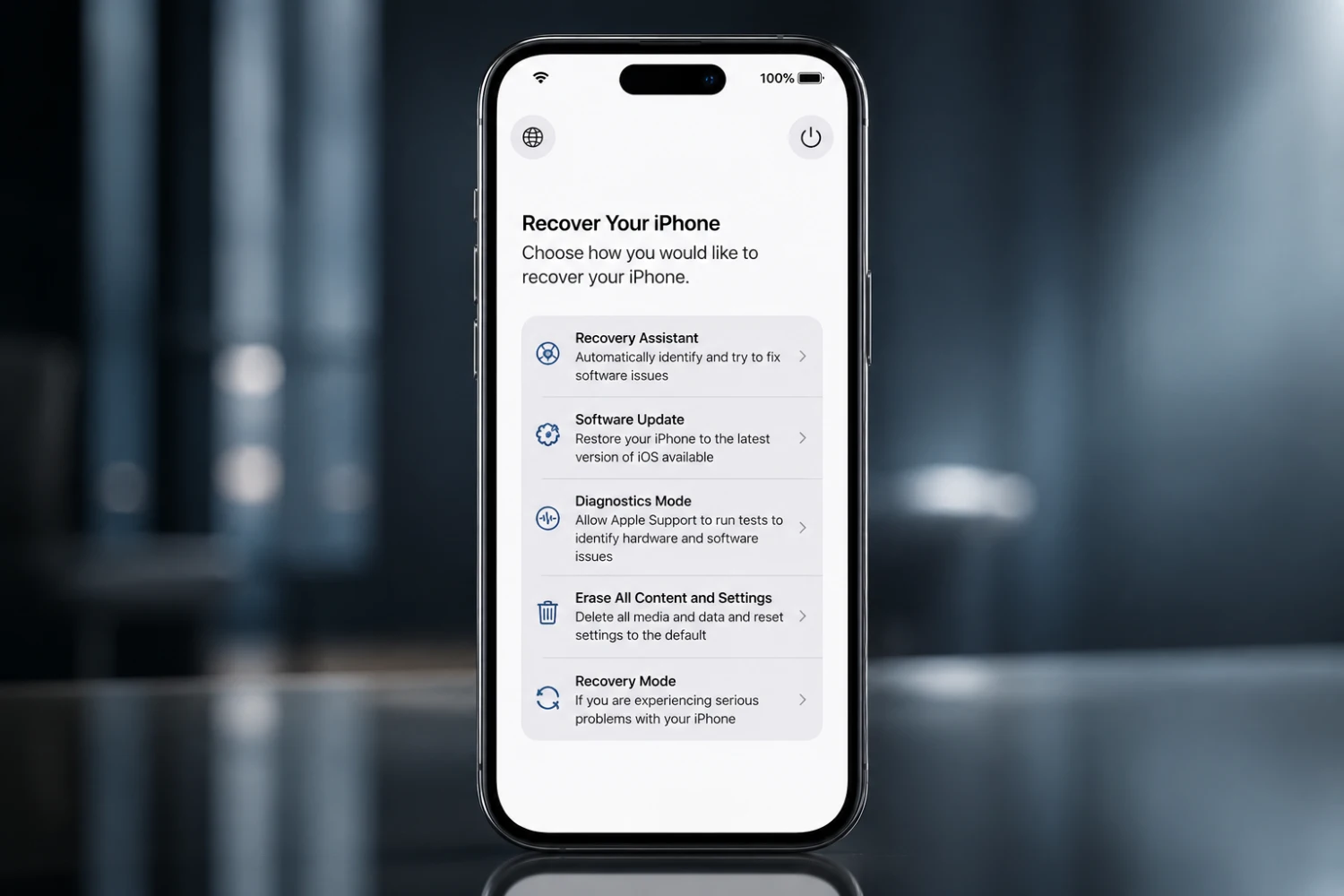
Apple has quietly added one of the most useful troubleshooting features ever seen on the iPhone. With iOS 27 and iPadOS 27, users now have access to a dedicated recovery environment that works similarly to the Recovery Mode found on modern Macs.
The new feature allows iPhones and iPads to boot into a special system interface without loading the main operating system. From there, users can repair software issues, reinstall iOS, run diagnostics, erase the device, and access automated troubleshooting tools—all without connecting to a Mac or PC.
A Mac-Like Recovery Experience
The recovery environment is designed to provide access to critical system functions when a device encounters serious software problems.
Instead of relying on external hardware to restore a malfunctioning iPhone or iPad, users can now perform many repair procedures directly on the device itself. This marks a significant change from previous iOS versions, where advanced recovery options often required a computer.
The feature is available on both iOS 27 and iPadOS 27.
How to Enter Recovery Mode
Accessing the new recovery mode is relatively simple.
First, completely power off the iPhone or iPad. Once the device is turned off, press and hold the power button. After the Apple logo appears, a progress bar will be displayed and the device will automatically boot into the recovery environment.
The process closely mirrors how Recovery Mode works on Apple Silicon Macs, where users also hold down the power button during startup to access recovery tools.
Available Recovery Options
Once inside the recovery interface, users can access several maintenance and troubleshooting features, including:
- Recovery Assistant
- Software Update
- Diagnostics Mode
- Erase All Content and Settings
- Recovery Mode
The interface also displays the device’s battery level and automatically connects to previously saved Wi-Fi networks when available.
A dedicated power button allows users to restart the device and return to normal operation at any time.
No Computer Required
Perhaps the biggest advantage of the new system is that many recovery tasks no longer require a Mac or Windows PC.
In previous versions of iOS, reinstalling firmware, repairing corrupted software, or recovering a device often meant connecting it to a computer and using Finder or iTunes. With iOS 27, many of these procedures can now be performed directly on the device itself.
This makes troubleshooting significantly more convenient for users who may not have immediate access to a computer.
Ideal for Failed Updates and Boot Loops
The new recovery mode could prove especially useful when software updates fail or become corrupted.
Interrupted installations and unstable beta versions have occasionally left iPhones stuck in reboot loops or unable to start properly. In such situations, the new Software Update section allows users to reinstall the latest version of iOS directly from the recovery environment.
This could eliminate the need for more advanced procedures such as DFU Mode restores and reduce the risk of lengthy recovery processes.
One of iOS 27’s Most Practical New Features
While many iOS updates focus on visual changes and new apps, the addition of a built-in recovery environment may ultimately be one of the most valuable improvements in iOS 27.